
Import your Hevy or Strong history into IronPack
Your training story should move with you. IronPack reads the CSV exports both apps provide, shows you a preview, and rebuilds your records and charts from the full history. Five minutes, no retyping, nothing lost.
Step 1: export your data
From Hevy
- Open Hevy and go to your Profile.
- Tap the settings icon, then choose Export & Import Data.
- Tap Export Workouts. Hevy produces a CSV file of your full history.
From Strong
- Open Strong and go to Settings.
- Choose Export Data. Strong produces a CSV file of your full history.
Save the file somewhere you can reach from your iPhone (Files, iCloud Drive or AirDrop it to yourself).
Step 2: import into IronPack
- Open IronPack, go to Settings, and tap Import workouts (CSV).
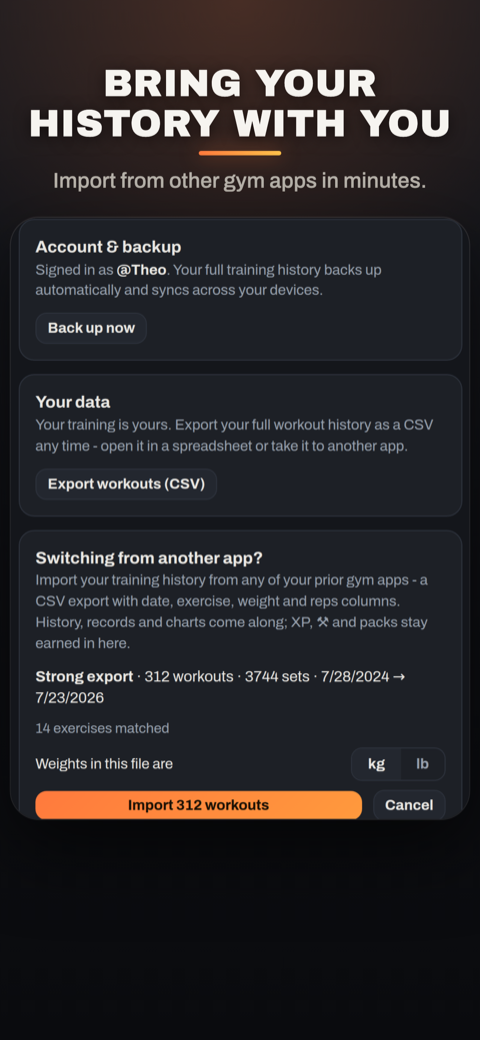
- Pick the exported file. IronPack detects the format automatically: Hevy, Strong or a generic export.
- Strong exports only: pick whether the file's weights are kg or lb (Strong's CSV does not say). Hevy exports carry the unit in the file and convert automatically.
- Check the preview: how many workouts and sets were found, the date range, and which exercise names matched IronPack's library. Unmatched names are listed so nothing imports silently wrong.
- Confirm. Your history, records, strength standards and charts are rebuilt from the full story.
Exactly what gets imported
Because trust beats hand-waving, this is the actual field mapping IronPack uses, straight from the import engine:
| From your export | Into IronPack |
|---|---|
| Workout title + start/end time (Hevy) or date + workout name + duration (Strong) | Session identity, start and finish times |
| Exercise name | Matched to IronPack's exercise library; unmatched names shown in the preview |
| Set order / set index | Set order within each exercise |
| Set type: warmup, normal, failure, dropset (Hevy); the W flag (Strong) | Warm-up, failure and drop sets kept as their proper types; warm-ups stay excluded from records and volume, exactly as if logged in-app |
| weight_kg or weight_lbs (Hevy), weight + your kg/lb answer (Strong) | Weights, stored in kilograms |
| Reps | Reps |
| Duration seconds | Cardio entries, as minutes |
Generic exports work too: any CSV with date, exercise, weight_kg (or weight) and reps columns imports the same way.
The honesty rules
- Imports never earn. No XP, no points, no packs, no streaks from imported history. Records and charts, yes; currency, never. The collection only certifies real training.
- Re-importing is safe. Workouts match by start time, so importing the same file twice cannot create duplicates.
- Leaving is just as easy. IronPack exports your full history to CSV any time, from the same Settings screen. Your data stays yours.
Bring your story. Start the game.
Import in five minutes. Your records arrive intact, and your next session earns your first pack.
Get IronPack free on the App StoreDeciding whether to switch at all? The honest comparisons: IronPack vs Hevy and IronPack vs Strong.
Last reviewed July 2026. Export steps reflect each app's current public documentation; the field mapping is verified directly against IronPack's import engine (v1.2). Hevy and Strong are trademarks of their owners; IronPack is not affiliated with either.